
 Finger-painting on a digital tablet and questions about Van Gogh's crabs.
I am listening to fake shutter noises in surround sound. This soundscape experience would last about two hours altogether, occasionally punctuated by a human voice shouting “no flash!”.
Inside room 45 at the National Gallery in London, a non-stop stream of visitors are snapping a wall of paintings by Van Gogh using compact digital cameras and smart phones. Isn’t it silly how these devices, which use silent electronic shutters, fake the sound from a physical mechanical one?
Say a wry ‘cheese’ for the irony. I am recording my own version of Van Gogh with fake paint! Using an application (ArtRage) on a mobile tablet, this is a first serious attempt at digital painting. The results, after a useful one-and-a-half hour guidance session from Joseph Anthony Connor, are quite convincing – paint-wise and skills-wise…

Stage 1: sketch outlines in pencil. The digital application simulates different canvases and drawing tools.

Stage 2: quickly paint in background areas

Stage 3: begin to build up the subject and details.

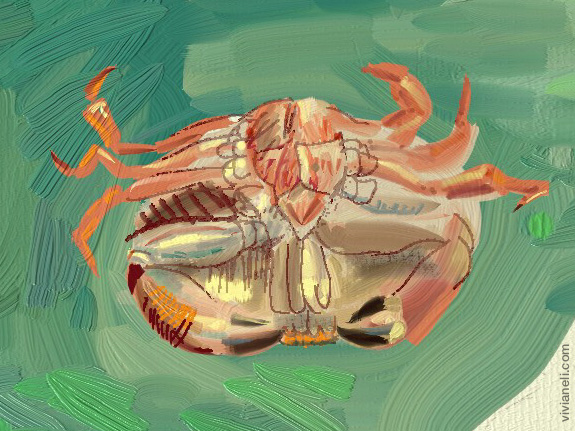
Stage 4: digital painting study from one of Van Gogh’s crabs. Image: Viviane Li
Yup, I am no Vincent. And digital paint is not physical paint. Similar to other things digital borrowed from analogue, it’s more useful to think about them as different tools with their own pros and cons, rather than get stuck in making direct comparisons. Sure, it simulates a good resemblance to paint consistency, but it was difficult recreating every brushstroke like the original. At a certain point, you have to work with the software’s own capabilities and forget what paint can do physically. That’s why already skilled painters might not take to it as much as the painting dabblers.
Learning tool
 During the painting process, it turns out to be a good learning tool too. Traditionally, art students learn by copying paintings and sculptures by established artists, as a way of exploring forms and techniques. In galleries and museums that only allow sketching using non-messy dry art materials (such as pens and pencils), digital painting can extend this possibility. It offers a way of exploring how painters painted, in a dry medium that most closely resembles the real thing.
Three crabs
From what I’ve already gathered about Van Gogh, he laid down paint quickly and worked intensely. In Two Crabs (1889), the former is evident in the green background, and the latter in the subject. He spent a lot more time and care in getting the form and feel of the creatures. The background was a quick paint-over by comparison; its main job was to provide a complimentary (clashing) colour to enhance the perceived redness of the crabs, making them more enticing to the viewer.
However, while studying the up-side-down crab, I discover that not everything about it seemed right. The mouth parts were very crudely painted and the second walking leg on its right looks anatomically unconvincing to my eye. (Looking up a related work subsequently – A Crab on its Back – has raised some interesting issues in my mind about the relationship between these two paintings.) But Van Gogh was never about the precise details, rather the overall feeling. And for that, he’s delivered some freshly caught and cooked, juicy, weighty crabs for my imaginary dinner!